Exercise 7: Interacting with tiles
Please complete Exercise 6 first, since the steps below build upon your work from that project.
For the last six exercises, we've been making a maze game that still has one major flaw: the ball can move right through the walls of the maze! In this exercise, we'll finally fix that.
Let's bounce
-
Open your project called "BOUNCE BRIX" that you saved from Exercise 6. On the CODE screen, find the file called "PLAYER" which should contain code like this:
# ADD THE BALL'S VELOCITY, MOVING THE BALL BY ONE STEP
.X + .DX -> .X
.Y + .DY -> .Y
In Exercise 4, we discussed how
DXandDYtrack the velocity of the ball.
How to make a ball bounce?
In a video game, a ball bouncing against a wall involves collision detection and rigid body dynamics. These topics are quite deep, even for simple 2D games, but today a very basic strategy will be enough:
- Try moving the ball one step (
DXorDY). - Check whether the ball now touches a wall.
- If so, bounce by undoing our move and reversing the sign of
DXorDY. For example ifDXwas (moving to the left in steps of 2 pixels), then we would change it to (moving to right in steps of 2 pixels).
How to check whether the ball is touching a wall? In the same the "PLAYER" file, we previously used
GET_TILE_AT_XY()to check whether the ball is touching a diamond (tile #2):# READ THE TILE NUMBER AT THE BALL'S CENTER
# (FIND THE CENTER BY ADDING 8, SINCE OUR SPRITE IS 16 X 16)
VAR TILE
ENGINE::TILE_LAYER_B.GET_TILE_AT_XY(.X + 8, .Y + 8) -> TILE
IF TILE = 2 THEN # DIAMOND
# ERASE THE DIAMOND WITH USING TILE #0
ENGINE::TILE_LAYER_B.SET_TILE_AT_XY(.X + 8, .Y + 8, 0)
SOUND::PLAY_TRACK(ID_SOUND::SOUND_0, 0)
MAIN::DIAMOND_COUNT + 1 -> MAIN::DIAMOND_COUNT
END IF - Try moving the ball one step (
-
Let's start with some refactoring. Refactoring means moving code around without changing what it does. We can refactor to make the code easier to understand, or to prepare for adding a new feature. Let's move the
GET_TILE_AT_XY()logic into a new function calledCHECK_COLLISIONS(). This function will check to see what the ball is touching. If it is touching a wall, the function returnsTRUEto indicate that we shouldBOUNCE.You can copy and paste this code into your "PLAYER" file. You don't need to retype everything by hand.
(Click to see the "PLAYER" file with these changes)
The "PLAYER" file:
CLASS PLAYER EXTENDS ACTOR
  # REMEMBER THE BALL'S VELOCITY
  VAR DX
  VAR DY

  HOOK THINK()
    IF GAMEPAD::LEFT AND .DX >= -2 THEN
      .DX - 1 -> .DX
    END IF
    IF GAMEPAD::RIGHT AND .DX <= 2 THEN
      .DX + 1 -> .DX
    END IF
    IF GAMEPAD::UP AND .DY >= -2 THEN
      .DY - 1 -> .DY
    END IF
    IF GAMEPAD::DOWN AND .DY <= 2 THEN
      .DY + 1 -> .DY
    END IF

    # ADD THE BALL'S VELOCITY, MOVING THE BALL BY ONE STEP
    .X + .DX -> .X
    .Y + .DY -> .Y

    .CHECK_COLLISION()

    # MAKE THE CAMERA FOLLOW THE BALL
    ENGINE::SET_CAMERA_CX(.X)
    ENGINE::SET_CAMERA_CY(.Y)
  END HOOK

  FUNC CHECK_COLLISION(): BOOL
    VAR BOUNCE: BOOL
    FALSE -> BOUNCE

    # (FIND THE CENTER BY ADDING 8, SINCE OUR SPRITE IS 16 X 16)
    VAR CHECK_X, CHECK_Y
    .X + 8 -> CHECK_X
    .Y + 8 -> CHECK_Y

    VAR TILE_LAYER_B: TILE_LAYER
    ENGINE::TILE_LAYER_B -> TILE_LAYER_B

    # READ THE TILE NUMBER AT THE BALL'S CENTER
    VAR TILE
    TILE_LAYER_B.GET_TILE_AT_XY(CHECK_X, CHECK_Y) -> TILE

    IF TILE = 2 THEN # DIAMOND
      # ERASE THE DIAMOND WITH USING TILE #0
      TILE_LAYER_B.SET_TILE_AT_XY(CHECK_X, CHECK_Y, 0)
      SOUND::PLAY_TRACK(ID_SOUND::SOUND_0, 0)
      MAIN::DIAMOND_COUNT + 1 -> MAIN::DIAMOND_COUNT
    END IF

    RETURN BOUNCE
  END FUNC
END CLASS -
Next, we need to add some logic to put
TRUEintoBOUNCEwhen we touch a wall. The empty spaces on our map use TILE #0, so for simplicity, let's assume that any other tile besides #0 is a kind of wall:IF TILE = 2 THEN # DIAMOND
# ERASE THE DIAMOND WITH USING TILE #0
TILE_LAYER_B.SET_TILE_AT_XY(CHECK_X, CHECK_Y, 0)
SOUND::PLAY_TRACK(ID_SOUND::SOUND_0, 0)
MAIN::DIAMOND_COUNT + 1 -> MAIN::DIAMOND_COUNT
ELSIF TILE <> 0 THEN
# THE BALL HIT A WALL OF SOME KIND
TRUE -> BOUNCE
END IF(Click to see the "PLAYER" file with these changes)
The "PLAYER" file:
CLASS PLAYER EXTENDS ACTOR
# REMEMBER THE BALL'S VELOCITY
VAR DX
VAR DY
HOOK THINK()
IF GAMEPAD::LEFT AND .DX >= -2 THEN
.DX - 1 -> .DX
END IF
IF GAMEPAD::RIGHT AND .DX <= 2 THEN
.DX + 1 -> .DX
END IF
IF GAMEPAD::UP AND .DY >= -2 THEN
.DY - 1 -> .DY
END IF
IF GAMEPAD::DOWN AND .DY <= 2 THEN
.DY + 1 -> .DY
END IF
# ADD THE BALL'S VELOCITY, MOVING THE BALL BY ONE STEP
.X + .DX -> .X
.Y + .DY -> .Y
.CHECK_COLLISION()
# MAKE THE CAMERA FOLLOW THE BALL
ENGINE::SET_CAMERA_CX(.X)
ENGINE::SET_CAMERA_CY(.Y)
END HOOK
FUNC CHECK_COLLISION(): BOOL
VAR BOUNCE: BOOL
FALSE -> BOUNCE
# (FIND THE CENTER BY ADDING 8, SINCE OUR SPRITE IS 16 X 16)
VAR CHECK_X, CHECK_Y
.X + 8 -> CHECK_X
.Y + 8 -> CHECK_Y
VAR TILE_LAYER_B: TILE_LAYER
ENGINE::TILE_LAYER_B -> TILE_LAYER_B
# READ THE TILE NUMBER AT THE BALL'S CENTER
VAR TILE
TILE_LAYER_B.GET_TILE_AT_XY(CHECK_X, CHECK_Y) -> TILE
IF TILE = 2 THEN # DIAMOND
  # ERASE THE DIAMOND WITH USING TILE #0
  TILE_LAYER_B.SET_TILE_AT_XY(CHECK_X, CHECK_Y, 0)
  SOUND::PLAY_TRACK(ID_SOUND::SOUND_0, 0)
  MAIN::DIAMOND_COUNT + 1 -> MAIN::DIAMOND_COUNT
ELSIF TILE <> 0 THEN
  # THE BALL HIT A WALL OF SOME KIND
  TRUE -> BOUNCE
END IF
RETURN BOUNCE
END FUNC
END CLASS -
Great, now we are ready to bounce! The code for moving in the X direction (left/right) looks like
.X + .DX -> .X. Let's add some logic to check whether the ball touches a wall. If so, we'll undo the movement, then bounce:# TRY MOVING
.X + .DX -> .X
IF .CHECK_COLLISION() THEN
.X - .DX -> .X # UNDO OUR MOVE
-.DX -> .DX # BOUNCE
END IF(Click to see the answer)
The "PLAYER" file:
CLASS PLAYER EXTENDS ACTOR
  # REMEMBER THE BALL'S VELOCITY
  VAR DX
  VAR DY

  HOOK THINK()
    IF GAMEPAD::LEFT AND .DX >= -2 THEN
      .DX - 1 -> .DX
    END IF
    IF GAMEPAD::RIGHT AND .DX <= 2 THEN
      .DX + 1 -> .DX
    END IF
    IF GAMEPAD::UP AND .DY >= -2 THEN
      .DY - 1 -> .DY
    END IF
    IF GAMEPAD::DOWN AND .DY <= 2 THEN
      .DY + 1 -> .DY
    END IF

    # ADD THE BALL'S VELOCITY, MOVING THE BALL BY ONE STEP
    .X + .DX -> .X
    IF .CHECK_COLLISION() THEN
      .X - .DX -> .X  # UNDO OUR MOVE
      -.DX -> .DX     # BOUNCE
    END IF

    .Y + .DY -> .Y

    # MAKE THE CAMERA FOLLOW THE BALL
    ENGINE::SET_CAMERA_CX(.X)
    ENGINE::SET_CAMERA_CY(.Y)
  END HOOK

  FUNC CHECK_COLLISION(): BOOL
    VAR BOUNCE: BOOL
    FALSE -> BOUNCE

    # (FIND THE CENTER BY ADDING 8, SINCE OUR SPRITE IS 16 X 16)
    VAR CHECK_X, CHECK_Y
    .X + 8 -> CHECK_X
    .Y + 8 -> CHECK_Y

    VAR TILE_LAYER_B: TILE_LAYER
    ENGINE::TILE_LAYER_B -> TILE_LAYER_B

    # READ THE TILE NUMBER AT THE BALL'S CENTER
    VAR TILE
    TILE_LAYER_B.GET_TILE_AT_XY(CHECK_X, CHECK_Y) -> TILE

    IF TILE = 2 THEN # DIAMOND
      # ERASE THE DIAMOND WITH USING TILE #0
      TILE_LAYER_B.SET_TILE_AT_XY(CHECK_X, CHECK_Y, 0)
      SOUND::PLAY_TRACK(ID_SOUND::SOUND_0, 0)
      MAIN::DIAMOND_COUNT + 1 -> MAIN::DIAMOND_COUNT
    ELSIF TILE <> 0 THEN
      # THE BALL HIT A WALL OF SOME KIND
      TRUE -> BOUNCE
    END IF

    RETURN BOUNCE
  END FUNC
END CLASS -
Click "Run" to run your program. The ball should now bounce left/right, but not up/down.
Can you add the corresponding logic for the Y direction?
(Click to see the answer)
The "PLAYER" file:
CLASS PLAYER EXTENDS ACTOR
  # REMEMBER THE BALL'S VELOCITY
  VAR DX
  VAR DY

  HOOK THINK()
    IF GAMEPAD::LEFT AND .DX >= -2 THEN
      .DX - 1 -> .DX
    END IF
    IF GAMEPAD::RIGHT AND .DX <= 2 THEN
      .DX + 1 -> .DX
    END IF
    IF GAMEPAD::UP AND .DY >= -2 THEN
      .DY - 1 -> .DY
    END IF
    IF GAMEPAD::DOWN AND .DY <= 2 THEN
      .DY + 1 -> .DY
    END IF

    # ADD THE BALL'S VELOCITY, MOVING THE BALL BY ONE STEP
    .X + .DX -> .X
    IF .CHECK_COLLISION() THEN
      .X - .DX -> .X  # UNDO OUR MOVE
      -.DX -> .DX     # BOUNCE
    END IF

    .Y + .DY -> .Y
    IF .CHECK_COLLISION() THEN
      .Y - .DY -> .Y  # UNDO OUR MOVE
      -.DY -> .DY     # BOUNCE
    END IF

    # MAKE THE CAMERA FOLLOW THE BALL
    ENGINE::SET_CAMERA_CX(.X)
    ENGINE::SET_CAMERA_CY(.Y)
  END HOOK

  FUNC CHECK_COLLISION(): BOOL
    VAR BOUNCE: BOOL
    FALSE -> BOUNCE

    # (FIND THE CENTER BY ADDING 8, SINCE OUR SPRITE IS 16 X 16)
    VAR CHECK_X, CHECK_Y
    .X + 8 -> CHECK_X
    .Y + 8 -> CHECK_Y

    VAR TILE_LAYER_B: TILE_LAYER
    ENGINE::TILE_LAYER_B -> TILE_LAYER_B

    # READ THE TILE NUMBER AT THE BALL'S CENTER
    VAR TILE
    TILE_LAYER_B.GET_TILE_AT_XY(CHECK_X, CHECK_Y) -> TILE

    IF TILE = 2 THEN # DIAMOND
      # ERASE THE DIAMOND WITH USING TILE #0
      TILE_LAYER_B.SET_TILE_AT_XY(CHECK_X, CHECK_Y, 0)
      SOUND::PLAY_TRACK(ID_SOUND::SOUND_0, 0)
      MAIN::DIAMOND_COUNT + 1 -> MAIN::DIAMOND_COUNT
    ELSIF TILE <> 0 THEN
      # THE BALL HIT A WALL OF SOME KIND
      TRUE -> BOUNCE
    END IF

    RETURN BOUNCE
  END FUNC
END CLASS
With these changes, the ball should now bounce like this:
The ball goes into the wall?
If you look closely, you may notice that the ball moves partway into the wall before bouncing. Can you guess why? It has something to do with this code:
# (FIND THE CENTER BY ADDING 8, SINCE OUR SPRITE IS 16 X 16)
VAR CHECK_X, CHECK_Y
.X + 8 -> CHECK_X
.Y + 8 -> CHECK_Y
We'll fix the problem in Exercise 8. Don't worry about it for now.
Brittle tiles
-
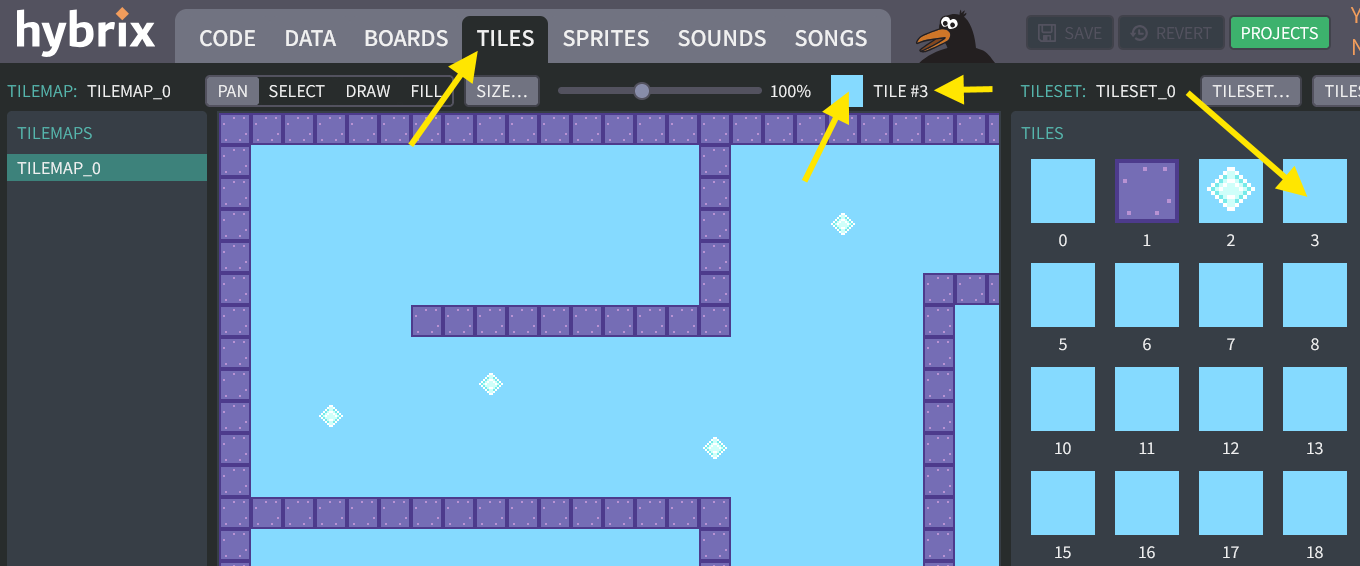
Let's add a "brittle" tile that disappears after the ball bounces against it. Go to the TILES screen. Click on blue box labeled "3" on the right side of the screen. A the top of your screen, the small blue box should change to say "TILE #3", like this:
-
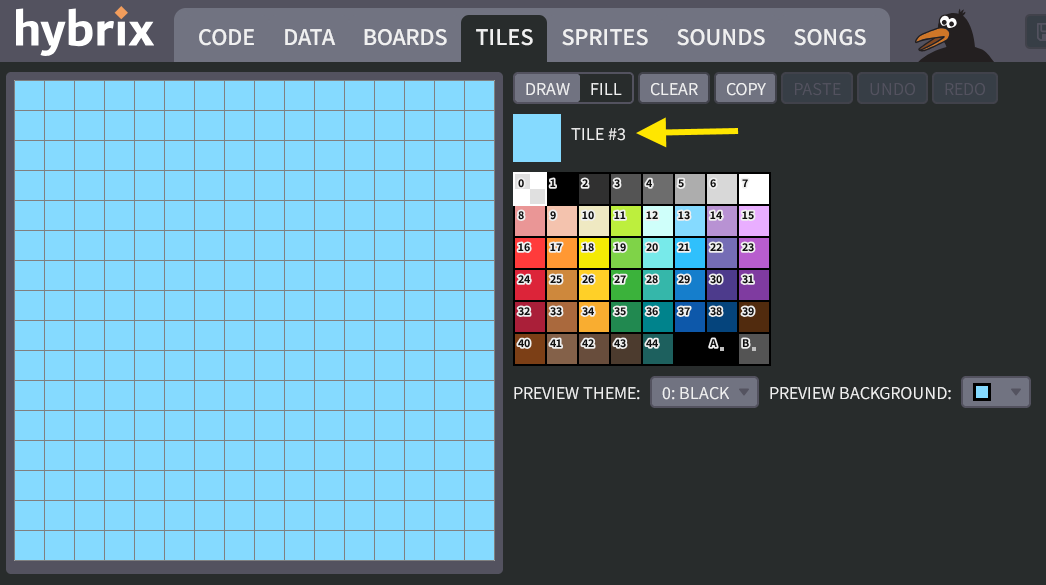
Click on the small tile. This will open the tile editor. Make sure it says "TILE #3":
Fill the tile with color #42 (bonbon). Then draw some cracks using color #43 (offroad):
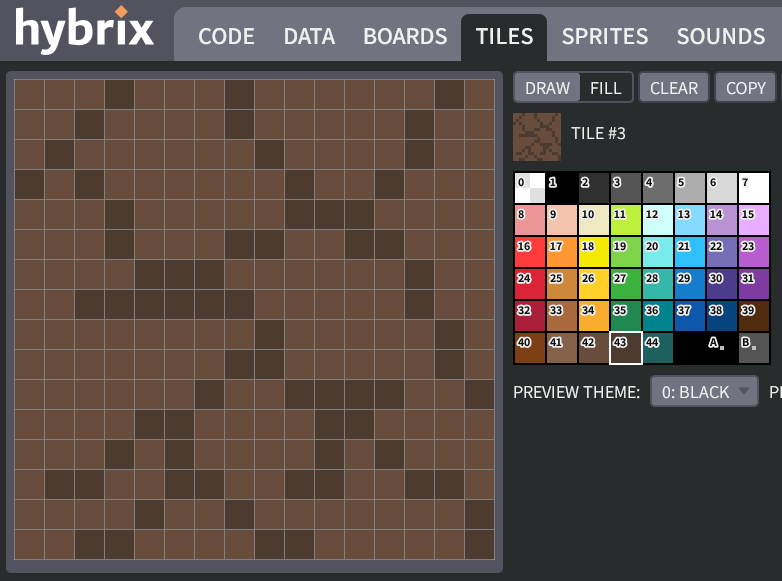
It's okay if your tile looks somewhat different from the picture above.
-
After you finish drawing, click the "DONE" button to return to the TILES screen. Click to draw a wall that is made from tile #3:
-
Now we need to write some code to handle this tile. Let's look at the existing rules:
IF TILE = 2 THEN # DIAMOND
  # ERASE THE DIAMOND WITH USING TILE #0
  TILE_LAYER_B.SET_TILE_AT_XY(CHECK_X, CHECK_Y, 0)
  SOUND::PLAY_TRACK(ID_SOUND::SOUND_0, 0)
  MAIN::DIAMOND_COUNT + 1 -> MAIN::DIAMOND_COUNT
ELSIF TILE <> 0 THEN
  # THE BALL HIT A WALL OF SOME KIND
  TRUE -> BOUNCE
END IF
For a diamond, we do this:
- Erase the diamond tile
- Play the diamond sound
- Increase the score
For a wall, we simply:
- Bounce
A brittle wall (tile #3) should combine some of each behavior:
- Erase the brittle tile
- Bounce
Can you add an
ELSIFto handle tile #3?(Click to see the answer)
The "PLAYER" file:
CLASS PLAYER EXTENDS ACTOR
  # REMEMBER THE BALL'S VELOCITY
  VAR DX
  VAR DY

  HOOK THINK()
    IF GAMEPAD::LEFT AND .DX >= -2 THEN
      .DX - 1 -> .DX
    END IF
    IF GAMEPAD::RIGHT AND .DX <= 2 THEN
      .DX + 1 -> .DX
    END IF
    IF GAMEPAD::UP AND .DY >= -2 THEN
      .DY - 1 -> .DY
    END IF
    IF GAMEPAD::DOWN AND .DY <= 2 THEN
      .DY + 1 -> .DY
    END IF

    # ADD THE BALL'S VELOCITY, MOVING THE BALL BY ONE STEP
    .X + .DX -> .X
    IF .CHECK_COLLISION() THEN
      .X - .DX -> .X  # UNDO OUR MOVE
      -.DX -> .DX     # BOUNCE
    END IF

    .Y + .DY -> .Y
    IF .CHECK_COLLISION() THEN
      .Y - .DY -> .Y  # UNDO OUR MOVE
      -.DY -> .DY     # BOUNCE
    END IF

    # MAKE THE CAMERA FOLLOW THE BALL
    ENGINE::SET_CAMERA_CX(.X)
    ENGINE::SET_CAMERA_CY(.Y)
  END HOOK

  FUNC CHECK_COLLISION(): BOOL
    VAR BOUNCE: BOOL
    FALSE -> BOUNCE

    # (FIND THE CENTER BY ADDING 8, SINCE OUR SPRITE IS 16 X 16)
    VAR CHECK_X, CHECK_Y
    .X + 8 -> CHECK_X
    .Y + 8 -> CHECK_Y

    VAR TILE_LAYER_B: TILE_LAYER
    ENGINE::TILE_LAYER_B -> TILE_LAYER_B

    # READ THE TILE NUMBER AT THE BALL'S CENTER
    VAR TILE
    TILE_LAYER_B.GET_TILE_AT_XY(CHECK_X, CHECK_Y) -> TILE

    IF TILE = 2 THEN # DIAMOND
      # ERASE THE DIAMOND WITH USING TILE #0
      TILE_LAYER_B.SET_TILE_AT_XY(CHECK_X, CHECK_Y, 0)
      SOUND::PLAY_TRACK(ID_SOUND::SOUND_0, 0)
      MAIN::DIAMOND_COUNT + 1 -> MAIN::DIAMOND_COUNT
    ELSIF TILE = 3 THEN # BRITTLE TILE
      TILE_LAYER_B.SET_TILE_AT_XY(CHECK_X, CHECK_Y, 0)
      TRUE -> BOUNCE
    ELSIF TILE <> 0 THEN
      # THE BALL HIT A WALL OF SOME KIND
      TRUE -> BOUNCE
    END IF

    RETURN BOUNCE
  END FUNC
END CLASS
The exit tile
-
Let's add one more tile, that will teleport you to the next level of the game. We can use tile #4 for that. You can draw it however you like, but here's an idea using colors #1 (black), #2 (raven), and #3 (frypan):
-
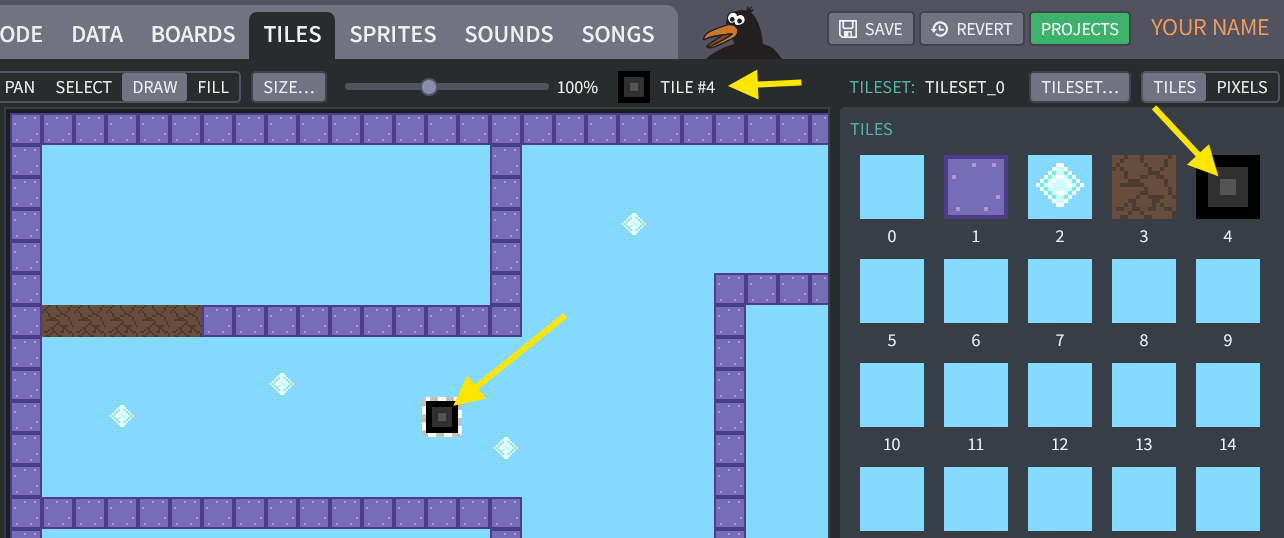
For testing purposes, let's put our exit tile near the start of our maze. Later, you can move it to the end:
A second maze level
-
When the ball reaches the exit, it will advance to the next level. Let's make a second tilemap. Go to the TILES screen, then click the "NEW TILEMAP" button:
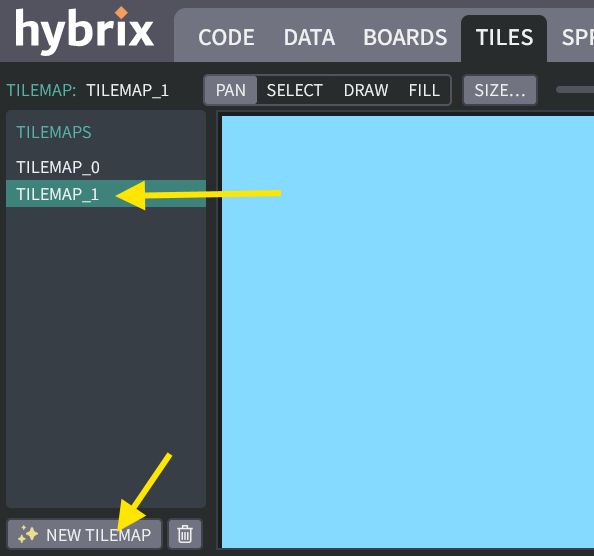
Our first level was called
TILEMAP_0. The second level will be calledTILEMAP_1. -
Draw a second maze. It can be anything you like, but make sure it's noticeably different from
TILEMAP_0. Maybe something like this: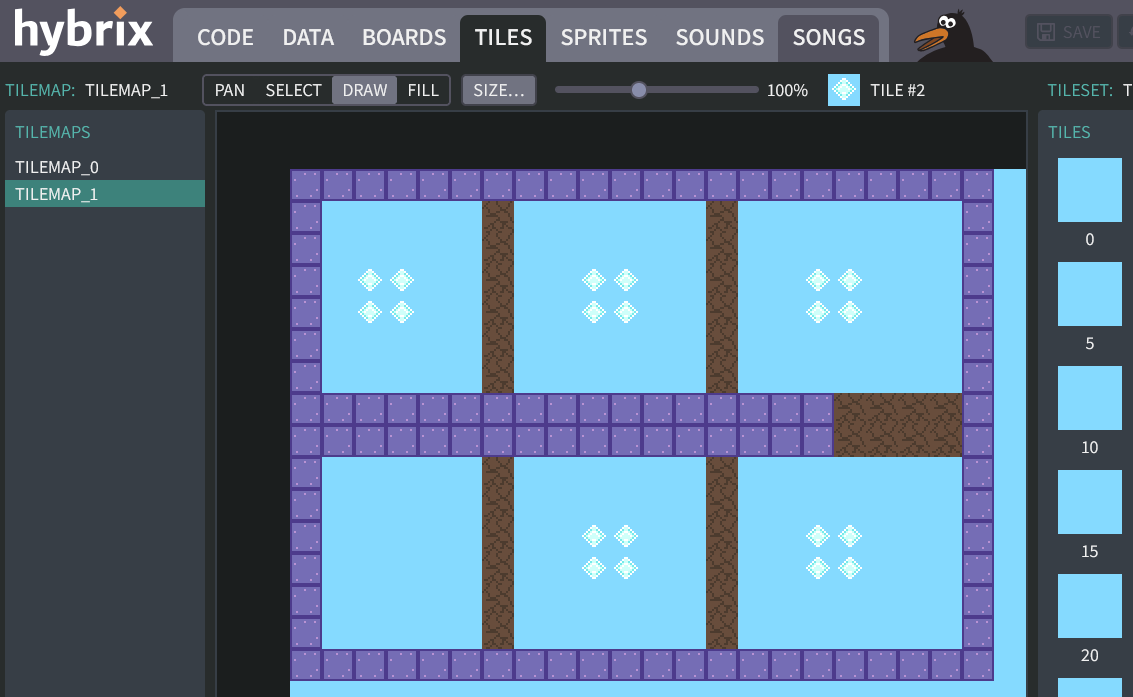
-
Next, go to the BOARDS screen. Click on the "BOARDS" tab. Then click the "NEW BOARD" button:
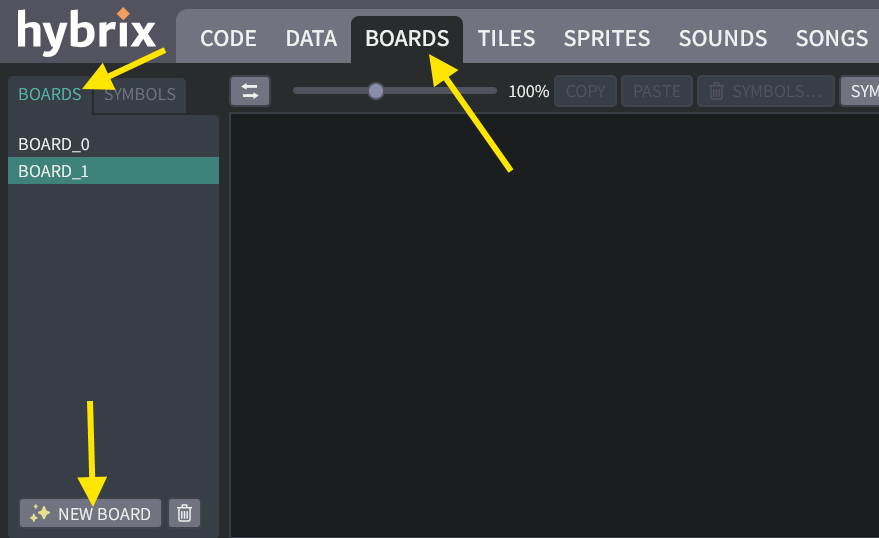
-
Click the "CREATE" button, then choose
S_SCENE: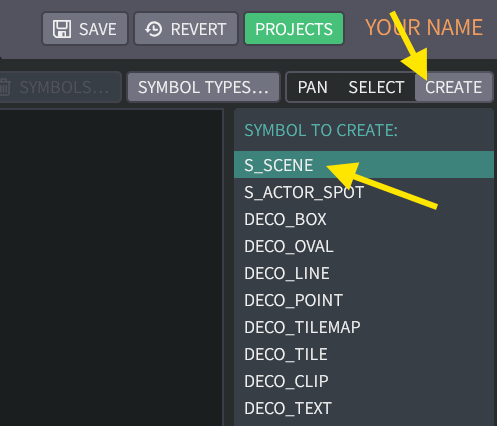
Make sure
BOARD_1is selected. Click in the upper-left corner of the board to create the new scene:
-
Click the "SELECT" button. On the panel at the right side of your screen, find the "FIGURE TILEMAP" section. Click the "CHANGE…" button and choose
TILEMAP_1.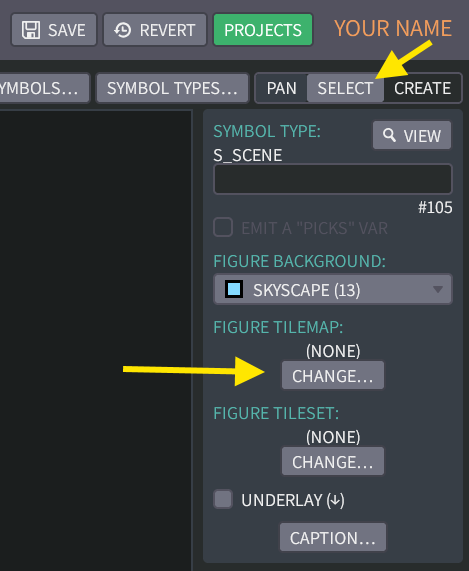
Your new maze should now appear on
BOARD_1: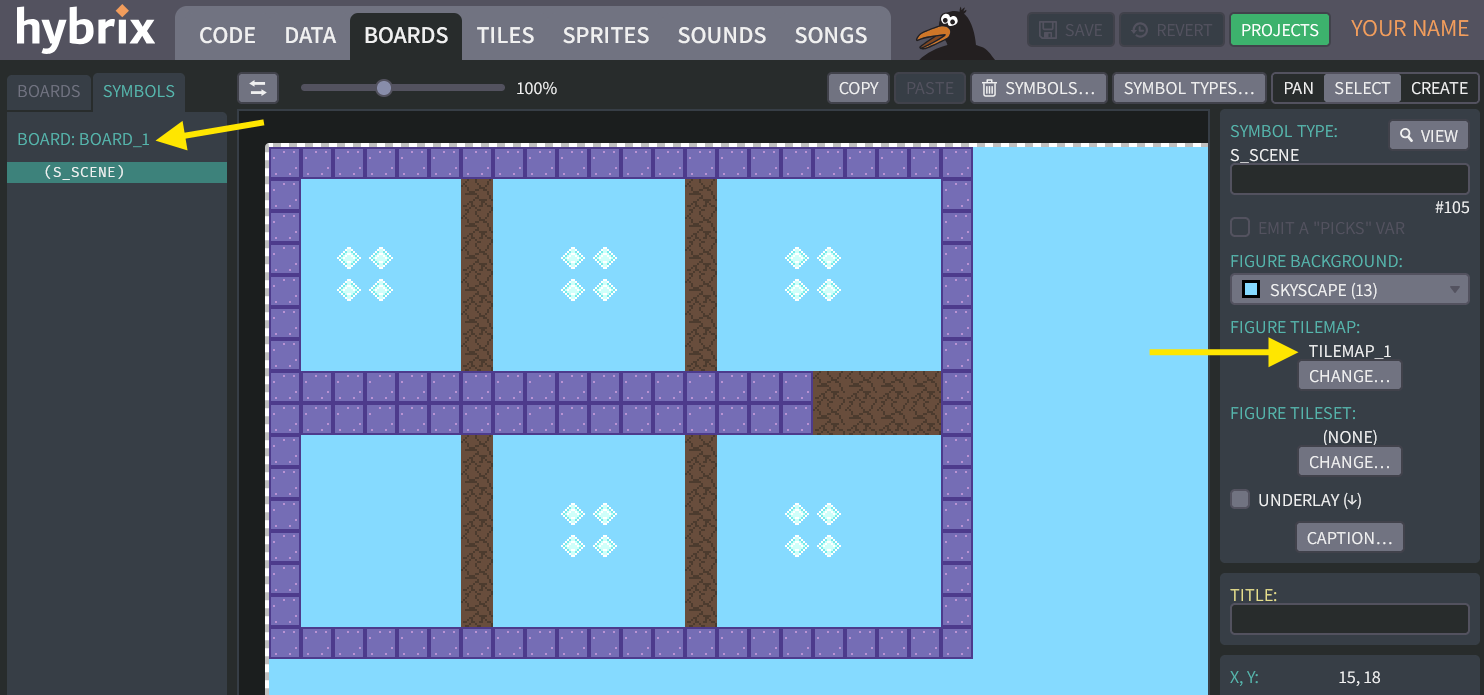
-
Let's also create an
S_ACTOR_SPOTto indicate where the ball will start in this level: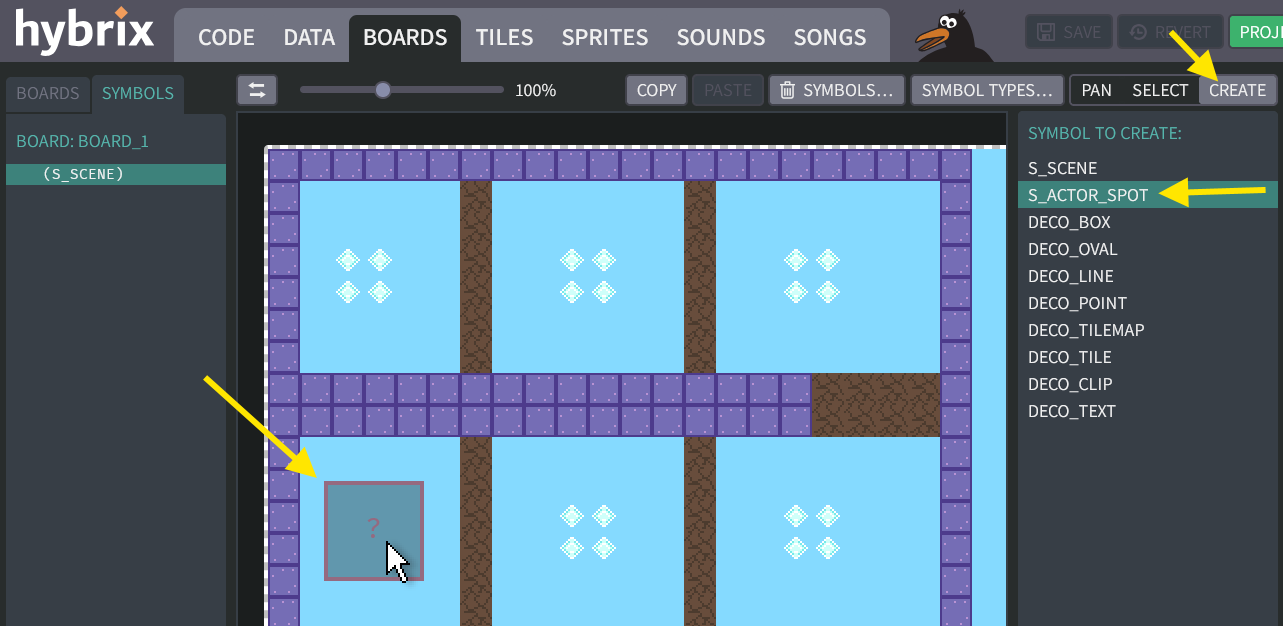
-
Choose
CLIP_0for its "FIGURE CLIP". And typePLAYERfor its "ACTOR FACTORY":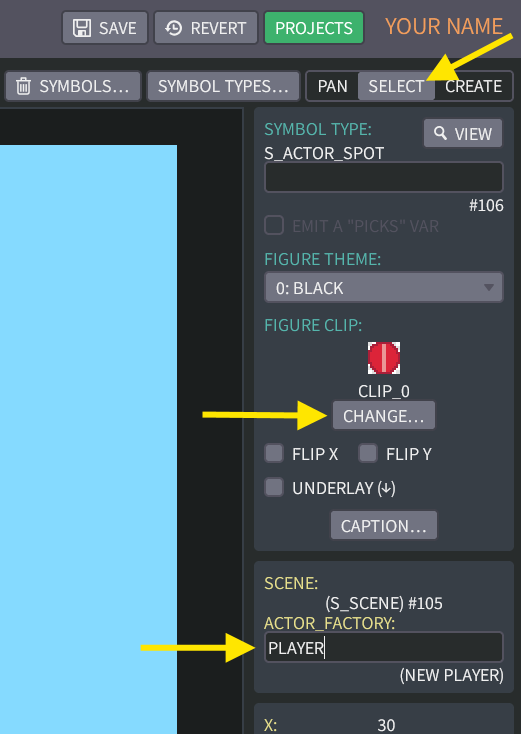
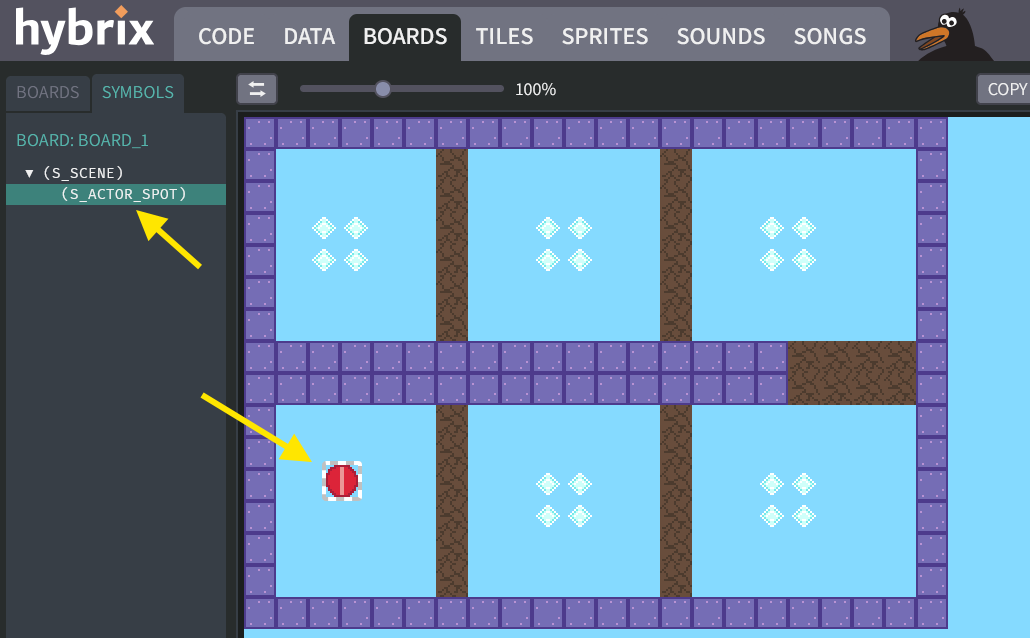
On the board, you should now see the red ball in your maze, like this:
Writing the code
How to change to a new level?
Up until now, we used the
THINK()function of thePLAYERfor collecting diamond tiles, for bouncing off of walls, and for breaking the brittle tiles. The "exit" tile will take us to a new level. Each level is anS_SCENEwith a tilemap maze, as well as an actor for the player's red ball, and maybe other actors in the future for other creatures. When we go to the next level, an entirely new scene is loaded, and the old one is discarded.If we try to do this in the middle of the
THINK()stage, we can end up with old actors trying to think or trying to interact with the old tilemap. Instead, changing levels needs to happen in the mainLOOP.But how will the main loop know whether the player reached the exit tile? We can use a variable
REACHED_EXITto signal this.
-
Go to the CODE screen, and click on the "MAIN" file. After Exercise 6, it should still have the code shown below:
(Click to see the "MAIN" file from Exercise 6)
The "MAIN" file: (OLD code)
MODULE MAIN
  VAR DIAMOND_COUNT

  FUNC START()
    ENGINE::INIT()
    SOUND::INIT()
    CONSOLE::INIT()

    IF SYMBOLS::SCENES <> NULL AND SYMBOLS::SCENES.SIZE > 0 THEN
      SYMBOLS::SCENES[0].LOAD()
    END IF

    LOOP
      ENGINE::RENDER()
      ENGINE::WAIT_FOR_PAINT()
      ENGINE::THINK()
      SOUND::THINK()
      CONSOLE::THINK()

      MAIN::SHOW_SCORE()
    END LOOP
  END FUNC

  FUNC SHOW_SCORE()
    7 -> IO::MATTE_COLOR
    CONSOLE::PRINT("{END}{U}{CLL}{R}{9}{MAT} {$99} ")
    CONSOLE::PRINT_INT(MAIN::DIAMOND_COUNT)
    CONSOLE::PRINT(" ")
  END FUNC
END MODULE -
Replace your "MAIN" file with this new code instead:
(Click to see the new code for the "MAIN" file)
The "MAIN" file: (NEW code)
MODULE MAIN
  VAR DIAMOND_COUNT
  VAR REACHED_EXIT: BOOL

  FUNC START()
    ENGINE::INIT()
    SOUND::INIT()
    CONSOLE::INIT()

    VAR LEVEL
    -1 -> LEVEL

    LOOP
      IF MAIN::REACHED_EXIT OR LEVEL < 0 THEN
        FALSE -> MAIN::REACHED_EXIT
        LEVEL + 1 -> LEVEL
        SYMBOLS::SCENES[LEVEL].LOAD()
      END IF

      ENGINE::RENDER()
      ENGINE::WAIT_FOR_PAINT()
      ENGINE::THINK()
      SOUND::THINK()
      CONSOLE::THINK()

      MAIN::SHOW_SCORE()
    END LOOP
  END FUNC

  FUNC SHOW_SCORE()
    7 -> IO::MATTE_COLOR
    CONSOLE::PRINT("{END}{9}{MAT}{U}{R} {$99} ")
    CONSOLE::PRINT_INT(MAIN::DIAMOND_COUNT)
    CONSOLE::PRINT(" ")
  END FUNC
END MODULE
The
LEVELvariable starts at so that when our game first starts,LEVEL + 1will cause this code to load the first mazeSYMBOLS::SCENES[0]. Later, whenREACHED_EXITbecomesTRUE(which we will accomplish in Step 21), the aboveIFstatement will load the second mazeSYMBOLS::SCENES[1].You can add as many levels as you like, and each one's exit tile will load the next higher number level.
(What if the player tries to exit from the last level? If
LEVELincreases beyond the end of the array, your program may fail with an error "ARRAY INDEX OUT OF BOUNDS".)How do the scenes get into the array?
The
SYMBOLS::SCENESvariable is an array that collects a list of all theS_SCENEsymbols from your boards. If you go to the DATA screen, you can see that it is made using a query: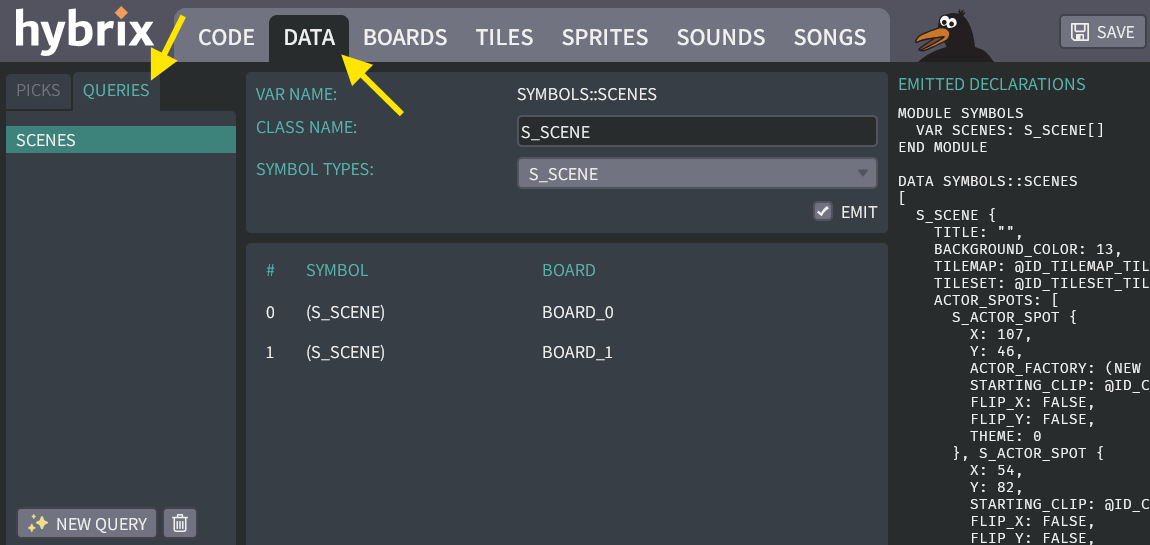
This query searches every board, and finds every symbol whose type is
S_SCENE, and puts them all into an array calledSCENES. We'll learn more about the DATA screen in a future exercise. -
Go to the CODE scene and open the "PLAYER" file. Now we just need to put
TRUE -> MAIN::REACHED_EXITwhenever the player reaches our exit (tile #4).(Click to see the "PLAYER" file with these changes)
The "PLAYER" file:
CLASS PLAYER EXTENDS ACTOR
  # REMEMBER THE BALL'S VELOCITY
  VAR DX
  VAR DY

  HOOK THINK()
    IF GAMEPAD::LEFT AND .DX >= -2 THEN
      .DX - 1 -> .DX
    END IF
    IF GAMEPAD::RIGHT AND .DX <= 2 THEN
      .DX + 1 -> .DX
    END IF
    IF GAMEPAD::UP AND .DY >= -2 THEN
      .DY - 1 -> .DY
    END IF
    IF GAMEPAD::DOWN AND .DY <= 2 THEN
      .DY + 1 -> .DY
    END IF

    # ADD THE BALL'S VELOCITY, MOVING THE BALL BY ONE STEP
    .X + .DX -> .X
    IF .CHECK_COLLISION() THEN
      .X - .DX -> .X  # UNDO OUR MOVE
      -.DX -> .DX     # BOUNCE
    END IF

    .Y + .DY -> .Y
    IF .CHECK_COLLISION() THEN
      .Y - .DY -> .Y  # UNDO OUR MOVE
      -.DY -> .DY     # BOUNCE
    END IF

    # MAKE THE CAMERA FOLLOW THE BALL
    ENGINE::SET_CAMERA_CX(.X)
    ENGINE::SET_CAMERA_CY(.Y)
  END HOOK

  FUNC CHECK_COLLISION(): BOOL
    VAR BOUNCE: BOOL
    FALSE -> BOUNCE

    # (FIND THE CENTER BY ADDING 8, SINCE OUR SPRITE IS 16 X 16)
    VAR CHECK_X, CHECK_Y
    .X + 8 -> CHECK_X
    .Y + 8 -> CHECK_Y

    VAR TILE_LAYER_B: TILE_LAYER
    ENGINE::TILE_LAYER_B -> TILE_LAYER_B

    # READ THE TILE NUMBER AT THE BALL'S CENTER
    VAR TILE
    TILE_LAYER_B.GET_TILE_AT_XY(CHECK_X, CHECK_Y) -> TILE

    IF TILE = 2 THEN # DIAMOND
      # ERASE THE DIAMOND WITH USING TILE #0
      TILE_LAYER_B.SET_TILE_AT_XY(CHECK_X, CHECK_Y, 0)
      SOUND::PLAY_TRACK(ID_SOUND::SOUND_0, 0)
      MAIN::DIAMOND_COUNT + 1 -> MAIN::DIAMOND_COUNT
    ELSIF TILE = 3 THEN # BRITTLE TILE
      TILE_LAYER_B.SET_TILE_AT_XY(CHECK_X, CHECK_Y, 0)
      TRUE -> BOUNCE
    ELSIF TILE = 4 THEN # EXIT TILE
      TRUE -> MAIN::REACHED_EXIT
    ELSIF TILE <> 0 THEN
      # THE BALL HIT A WALL OF SOME KIND
      TRUE -> BOUNCE
    END IF

    RETURN BOUNCE
  END FUNC
END CLASS -
Click "RUN" to try your game. When the red ball touches the exit tile, the ball should teleport to your new maze (
TILEMAP_1fromBOARD_1).
Great job! That's all for Exercise 7. In the next exercise, we'll fix the problem we noticed in Step 5, where the ball moves partway into the wall before bouncing.