Gamepads
Besides keyboard input, the Hybrix virtual computer also features two gamepad input devices. A gamepad has four buttons and a directional controller. The directional controller can be either a D-pad or an analog stick.
You can connect real gamepads to your computer and use them with Hybrix, as long as the device is compatible with the web browser's Gamepad API. Hybrix officially recommends the 8BitDo SN30 Pro gamepad. Another option is to connect a game controller from a popular console such as PlayStation, Xbox, or Nintendo Switch, which is often possible using Bluetooth or USB.
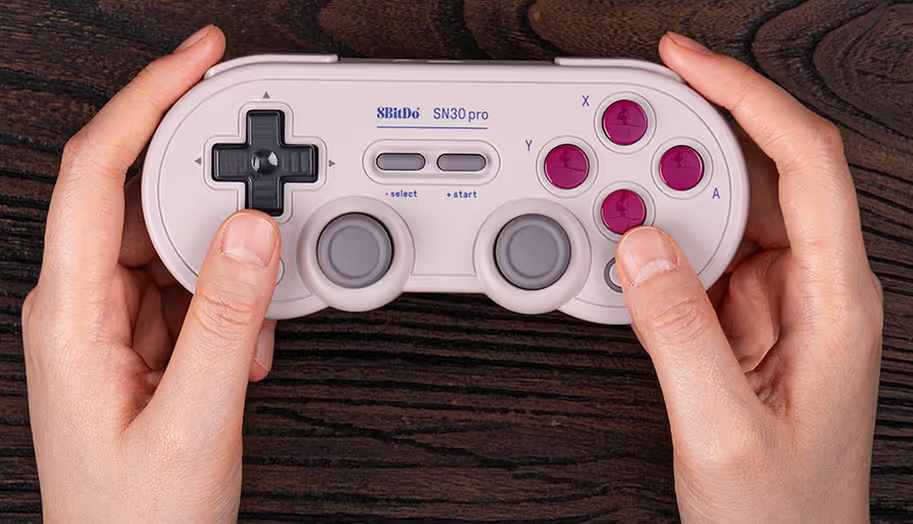
A typical gamepad with a D-pad and two analog sticks (gray circles)
Keyboard mappings
Real gamepads get mapped to the io::gamepads[] array according to the order in which they were connected.
If there are less than 2 real gamepads connected, you can use keyboard mappings to simulate a "virtual" gamepad. The "Configure Controllers" panel provides three choices:
| Gamepad | Keyset A (PC) | Keyset A (Mac) | Keyset B | Keyset C |
|---|---|---|---|---|
| Button A | SHIFT | SHIFT (⇧) | 1 | N |
| Button B | Z | Z | 2 | M |
| Button C | X | X | 3 | , |
| Button D | CTRL | OPTION (⌥) | 4 | . |
| Up | UP | UP | W | UP |
| Down | DOWN | DOWN | S | DOWN |
| Left | LEFT | LEFT | A | LEFT |
| Right | RIGHT | RIGHT | D | RIGHT |
Keyset A is most convenient for a single person. Keyset B and Keyset C allow two people to play together using the keyboard.
Currently the individual keys are not configurable, but a settings page may be added in the future.
Directional controller
The io_hand_controller.x and io_hand_controller.y members report the state of the directional controller. The value is approximately zero when the controller is in its center position; otherwise, it ranges from -1,023 to 1,023 with negative corresponding to left or up.
These values are typically measured imprecisely. Programs that need highly accurate input often implement a "calibration" screen. For digital controllers, it's recommended to consider the D-pad to be "pressed" if the value is less than -511 or greater than 511.
Many controllers have both a D-pad and an analog stick. In this case, Hybrix uses both inputs: io_hand_controller.x and io_hand_controller.y will report the analog stick whenever the D-pad is not being pressed.
Framework API
For beginners, the Hybrix framework provides a simplified gamepad module. You must call engine::think() regularly to update its fields:
module gamepad
  var left: bool
  var right: bool
  var up: bool
  var down: bool
  var button_a: bool
  var button_b: bool
  var button_c: bool
  var button_d: bool
end module
I/O definitions
class io_hand_controller # size 8
  # 0  = disabled
  # 1  = gamepad
  # 16 = mouse (x and y are rolling counters)
  var kind: byte

  # +1 = a  /  mouse main button
  # +2 = b  /  mouse middle button
  # +4 = c  /  mouse secondary button
  # +8 = d
  var buttons: byte

  # Gamepad:  (left) -1023 .. +1023 (right)
  var x: pair

  # Gamepad:    (up) -1023 .. +1023 (down)
  var y: pair

  var reserved: pair
end class
module io
  . . .
  inset gamepad_0: io_hand_controller         located at $d0_0060
  inset gamepad_1: io_hand_controller         located at $d0_0068
  inset gamepads: io_hand_controller[inset 2] located at $d0_0060
  . . .
end module